The Worg project is an embedded system for environmental monitoring of a greenhouse with 4 plants. By reading soil moisture and environmental conditions, the system controls humidity levels, temperature, VPD (Vapour-pressure Deficit), and the automatic watering of the plants. The architecture is based on an ESP32 programmed in MicroPython, communication via MQTT protocol with Mosquitto Broker, data persistence in InfluxDB, and custom visualization in Grafana, all integrated in this WordPress site for project presentation. All data below is updated in real time every 10 minutes.
Real-Time Metrics
Environment Conditions:
Electrical data:
Soil Moisture (In development):
Ecosystem
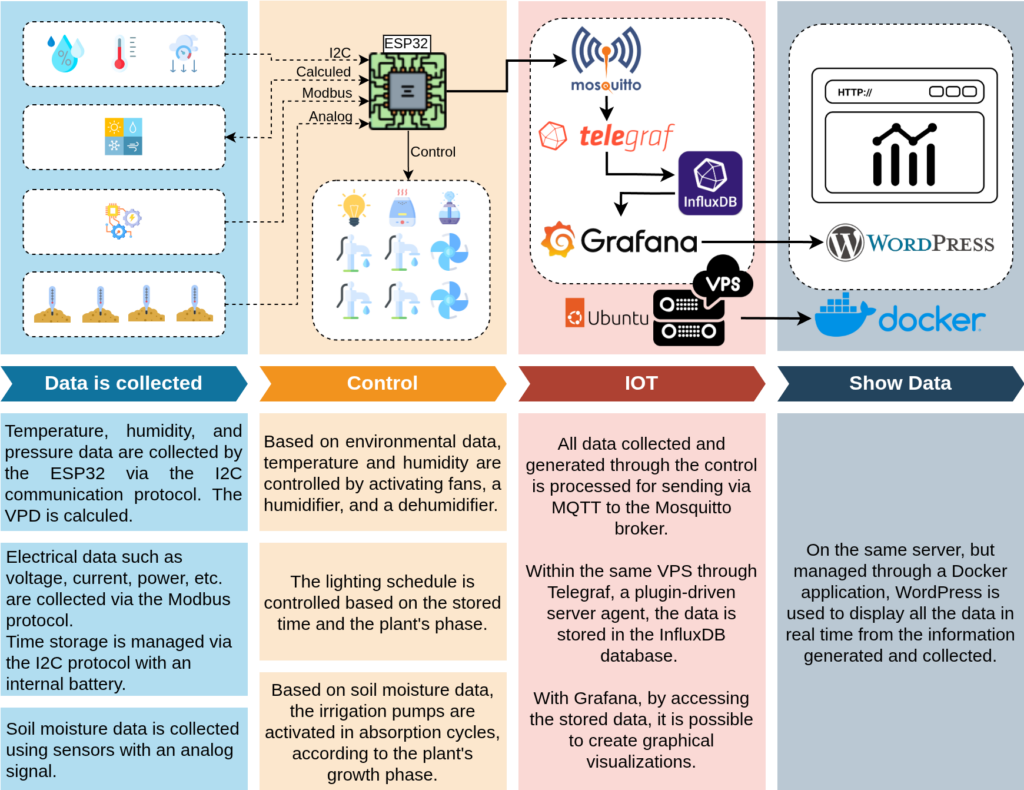
Using an ESP32 microcontroller, environmental data such as temperature, humidity, pressure, and soil moisture are collected via different protocols (I2C, Modbus) and analog signals. Based on this information, the system performs automated controls, such as activating fans, humidifiers, and irrigation pumps, as well as managing lighting according to the plant’s growth stage. All data is sent via MQTT protocol to a Mosquitto broker hosted on a VPS, where it is stored in the InfluxDB database through Telegraf. Finally, the information is visualized in real time on Grafana, with visual charts displayed on WordPress, also hosted in the same virtualized environment using Docker.
Technologies Used
For the development of the application, a set of technologies that communicate with each other and feature collaborative and open-source development was chosen. Among them, I highlight the solutions below, along with their respective configuration files, to provide an understanding of the project’s operational behavior.
‘The MQTT protocol provides a lightweight method of carrying out messaging using a publish/subscribe model. This makes it suitable for Internet of Things messaging such as with low power sensors or mobile devices such as phones, embedded computers or microcontrollers.’
Due to the ESP32 not having enough processing power to run all the programmed functions, it was not possible to establish an SSL connection between the device and the broker. The communication worked, but the control and IoT sending codes were impaired. This will be adjusted as described in ‘Next Steps’.
Although the broker settings are configured with a ‘Keep Alive’ of 300 seconds and messages are sent every 10 minutes, the connection could be renewed whenever necessary. If more processes accumulate in the future, an adjustment might be needed.
‘Telegraf is an open source plugin-driven server agent for collecting and reporting time series data. Written in Go and compiled as a standalone binary, you can execute it on any system with no external dependencies. Telegraf also contains in-memory metric buffers to maintain data collection if the downstream database is temporarily unavailable.’
I chose to load all MQTT message topics, as data collection is done only for this project, so it is configured as: topics = ['worg/#'].
Port 1883 refers to the broker, installed on the same VPS.
Port 8086 refers to the InfluxDB database, on the same VPS.
There is an output configuration for the ‘Loki’ service, included in ‘Next Steps’.
‘InfluxDB is a time series database (TSDB) developed by the company InfluxData. It is used for storage and retrieval of time series data in fields such as operations monitoring, application metrics, Internet of Things sensor data, and real-time analytics.’
System configuration file: There is none; all configurations were built through the service’s web interface.
Details:
Due to the adjustment phase of the data retention period in relation to the available storage on the VPS, it is currently configured for only 1 month. This will be adjusted according to the amount of data sent per day and monitored for capacity efficiency.
‘Easily collect, correlate, and visualize data with beautiful dashboards using Grafana — the open source data visualization and monitoring solution that drives informed decisions, enhances system performance, and streamlines troubleshooting’.
System configuration file (Sensitive data has been replaced with ‘###’):
[server]
# Protocol (http, https, h2, socket)
protocol = http
# The ip address to bind to, empty will bind to all interfaces
http_addr = 0.0.0.0
# The http port to use
http_port = 3000
# The public facing domain name used to access grafana from a browser
domain = roni.engineer
# Redirect to correct domain if host header does not match domain
# Prevents DNS rebinding attacks
;enforce_domain = true
# The full public facing url you use in browser, used for redirects and emails
# If you use reverse proxy and sub path specify full url (with sub path)
root_url = https://roni.engineer:8443/
# Serve Grafana from subpath specified in `root_url` setting. By default it is set to `false` for compatibility reasons.
serve_from_sub_path = true
[auth.anonymous]
# enable anonymous access
enabled = true
# specify organization name that should be used for unauthenticated users
org_name = Main Org.
# specify role for unauthenticated users
org_role = Viewer
[unified_alerting.prometheus_conversion]
# Configuration options for converting Prometheus alerting and recording rules to Grafana rules.
# These settings affect rules created via the Prometheus conversion API.
# Offset the rule evaluation time for imported rules by a specified duration in the past.
# This offset is applied and saved to the rule query during the conversion process from Prometheus to Grafana format.
# The setting only affects rules imported after the configuration change is made and does not modify existing rules.
# Accepts duration formats like: 30s, 1m, 1h.
rule_query_offset = 1m
#################################### Recording Rules #####################
[recording_rules]
# Enable recording rules.
enabled = true
# Request timeout for recording rule writes.
timeout = 30s
# Default data source UID to write to if not specified in the rule definition.
default_datasource_uid =
# Optional custom headers to include in recording rule write requests.
[recording_rules.custom_headers]
# exampleHeader = exampleValue
[feature_highlights]
# Setting ‘enabled’ to true enables highlighting Enterprise features in UI.
enabled = false
Details:
In [auth.anonymous], access status is enabled so that the charts generated via iframe and displayed on the WordPress website are accessible to anyone, but only for viewing.
This demonstration of the configuration file is only an excerpt of the adjustments made. All other default example information remains on the server but is not available here, as it is too extensive.
‘A safer container ecosystem, for everyone. Free hardened images give every developer a trusted starting point, with enterprise options for SLAs, compliance, and extended lifecycle security’.
System configuration file: There is none; all configurations were built through the service’s web interface.
Details:
A simple theme with few resources was used. The purpose of this website is merely explanatory within the context of the project as a whole. However, two plugins were used to improve reader usability, namely:
Page scroll to id, so that the website resembled a single continuous page with anchors in the menus.
WP Image Zoom, so that the electronic diagram could be visualized with more details.
The Code
The system was developed in MicroPython running on an ESP32, in which all the libraries used, the main code, and other files are demonstrated in the following topics. Part of the development was set aside to be executed in the future, as seen in ‘Next Steps’, due to difficulties encountered during development, including electronic problems and issues with process concurrency, which is limited to two threads on this microcontroller.
Below, are all the libraries used for the development of the application, with proper credits and a brief explanation of how they were incorporated into the main code.
bme280.py
This library was used to collect temperature, humidity, and environment pressure data from a BME280 sensor with I2C communication.
ds3231.py
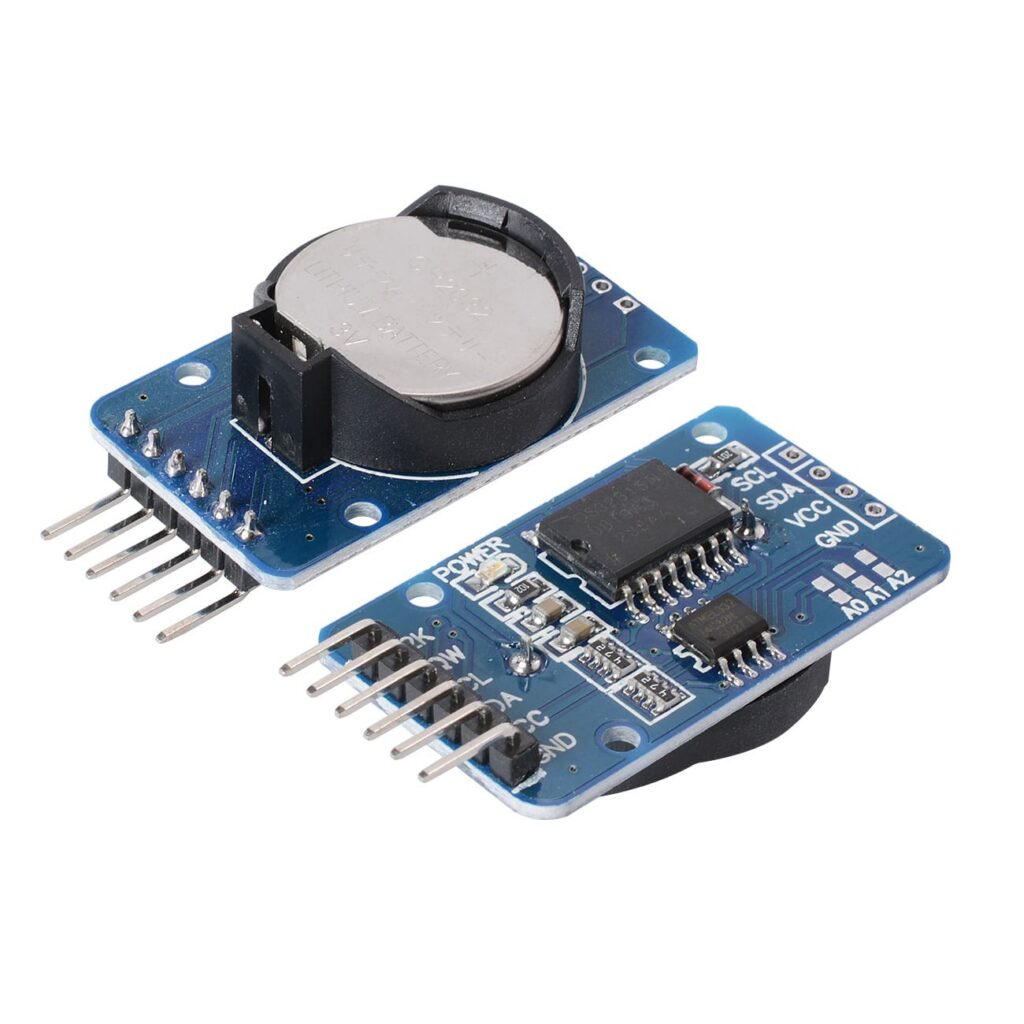
For time control, an RTC module was used so that it would not depend on internet connection or be affected by microcontroller reboots. This way, this module with an internal battery can manage dates and times offline.
mcp23017.py
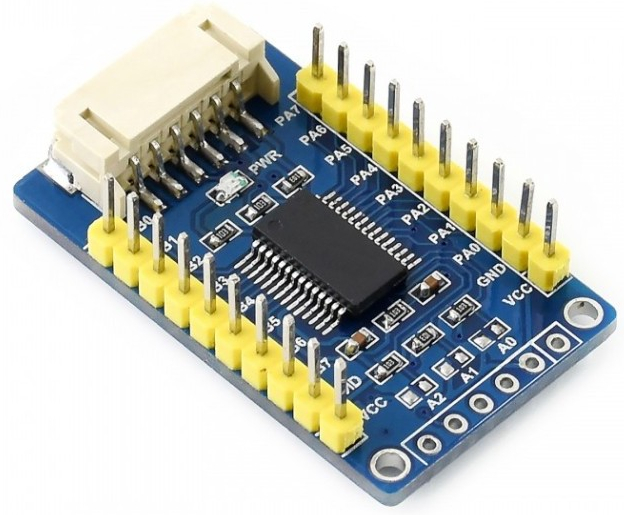
Due to the number of devices connected between inputs and outputs, it was necessary to use an MCP23017 module to expand these ports. As a result, there are still spare ports that can be used in future adjustments.
pzem.py
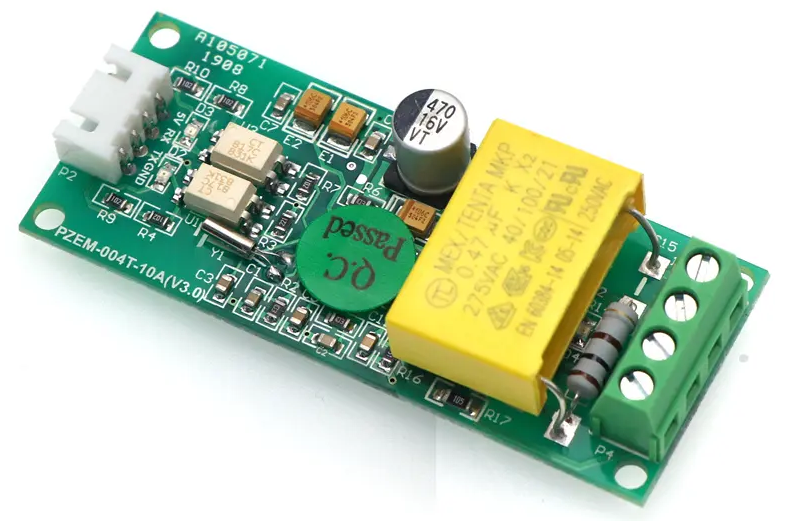
To collect the project’s electrical data, such as voltage, current, frequency, active power, power factor, and active energy, a PZEM-004T module with Modbus-RTU communication was used.
umqtt_simple.py
For MQTT communication between the ESP32 and the Mosquitto broker, this simple yet functional library was used.
soil.py
from machine import Pin, ADC
from time import sleep
import time
import _thread
import gc
class Soil:
def __init__(self):
# ATRIBUTES
self.PLANT_1 = ADC(Pin(34))
self.PLANT_2 = ADC(Pin(35))
self.PLANT_3 = ADC(Pin(32))
self.PLANT_4 = ADC(Pin(33))
self.pack_time = 5*60 #seconds
self.read_by_pack = 10 #seconds
# configure ADC ports to 0-3.3V (ESP32)
self.PLANT_1.atten(ADC.ATTN_11DB)
self.PLANT_2.atten(ADC.ATTN_11DB)
self.PLANT_3.atten(ADC.ATTN_11DB)
self.PLANT_4.atten(ADC.ATTN_11DB)
# creating lists to store values
self.LIST_PLANT1 = []
self.LIST_PLANT2 = []
self.LIST_PLANT3 = []
self.LIST_PLANT4 = []
# making value 0 to average value
self.AVERAGE_PLANT1 = 4095
self.AVERAGE_PLANT2 = 4095
self.AVERAGE_PLANT3 = 4095
self.AVERAGE_PLANT4 = 4095
# defining the initial time
self.thread_started = False
self.start_time = time.time()
def soil_loop(self):
self.thread_started = True
while True:
gc.collect()
# reading the value of sensors
value_PLANT1 = self.PLANT_1.read()
value_PLANT2 = self.PLANT_2.read()
value_PLANT3 = self.PLANT_3.read()
value_PLANT4 = self.PLANT_4.read()
# storing the values in the list
self.LIST_PLANT1.append(value_PLANT1)
self.LIST_PLANT2.append(value_PLANT2)
self.LIST_PLANT3.append(value_PLANT3)
self.LIST_PLANT4.append(value_PLANT4)
# verifing the time
if time.time() – self.start_time >= (self.pack_time):
# calculating the average of the reads
self.AVERAGE_PLANT1 = sum(self.LIST_PLANT1) / len(self.LIST_PLANT1)
self.AVERAGE_PLANT2 = sum(self.LIST_PLANT2) / len(self.LIST_PLANT2)
self.AVERAGE_PLANT3 = sum(self.LIST_PLANT3) / len(self.LIST_PLANT3)
self.AVERAGE_PLANT4 = sum(self.LIST_PLANT4) / len(self.LIST_PLANT4)
# reboot lists and time
self.LIST_PLANT1 = []
self.LIST_PLANT2 = []
self.LIST_PLANT3 = []
self.LIST_PLANT4 = []
self.start_time = time.time()
# waiting 1 sec to next read
sleep(self.read_by_pack)
def get_soil(self):
return self.AVERAGE_PLANT1, self.AVERAGE_PLANT2, self.AVERAGE_PLANT3, self.AVERAGE_PLANT4
sensor_soil = Soil()
_thread.start_new_thread(sensor_soil.soil_loop, ())
Soil moisture readings proved to be extremely unstable in several tests, which could cause incorrect watering of the plants. Therefore, I developed a small script that performs multiple readings over a predetermined time and stores them in lists. After that time, the average value of the measurements is stored in a variable. Furthermore, it was necessary to use a dedicated thread for this function, so that the collection is constantly performed, regardless of the state of the main code. This ensures that the control logic always remains the priority.
Due to some issues with electromagnetic interference affecting the signal from the soil moisture sensors, I disabled this functionality for now, and consequently, automatic watering as well. This part of the project has been prioritized in ‘Next Steps’.
Variables
To facilitate the development of the main code (‘main’), I chose to create a kind of ‘variable library’ for all data reading and control points. This way, it became clearer and easier to identify the microcontroller’s behavior. In this Python file, all variables collected from the electronic module libraries used, the calculations, and the microcontroller’s control points are concentrated.
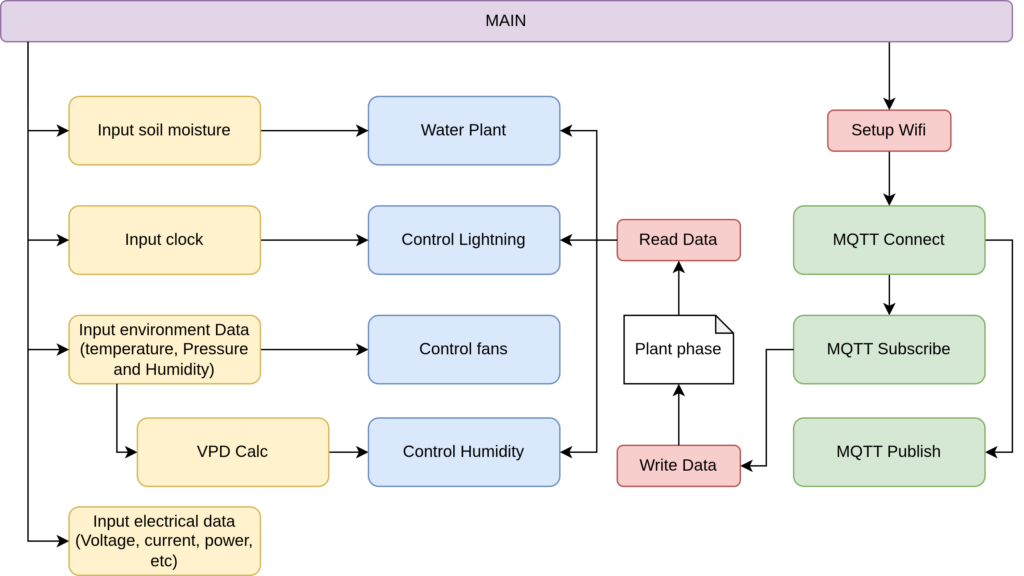
The main code is divided into two main fronts: environmental control, which is the priority to function under any circumstances, especially if there is no internet connection or if a sensor fails, and MQTT connection. To achieve this, all sensors and generated data considered as ‘inputs’ are read, including ‘plant phase’, which is received via MQTT. Then, the control of plant watering, lighting, fans, and humidity is carried out. In parallel, the system connects to the broker, receives and sends data.
Below, is the basic operation of the code:
main.py
import network
from time import sleep
import time
from variables import IO
from Libs.umqtt_simple import MQTTClient
from Libs.ds3231 import DS3231
from machine import I2C, Pin, ADC
import Libs.mcp23017
from Libs.soil import sensor_soil
import passwords
# ———–ATRIBUTES———–#
io = IO()
SSID = passwords.SSID
PASSWORD = passwords.PASSWORD
MQTT_ID = passwords.MQTT_ID
MQTT_SERVER = passwords.MQTT_SERVER
MQTT_PORT = passwords.MQTT_PORT
MQTT_USER = passwords.MQTT_USER
MQTT_PASSWORD = passwords.MQTT_PASSWORD
i2c = I2C(0, scl=Pin(22), sda=Pin(21), freq=400000)
mcp = Libs.mcp23017.MCP23017(i2c, 0x27)
ds = DS3231(i2c)
circle = 10*60
# ———–INTERNET CONECTION ———-#
def setup_wifi():
wlan = network.WLAN(network.STA_IF)
wlan.active(True)
print(“Connecting to WiFi…”)
print(f”SSID: {SSID}”)
if not wlan.isconnected():
wlan.connect(SSID, PASSWORD)
print(“Trying connection…”)
return wlan
# ———–SETTING PARAMETER OF LIGHT AND ENVIRONMENT ———-#
def write_data(topic, message):
topic = topic.decode(‘utf-8’)
value = message.decode(‘utf-8’)
plant_phase = read_data()
if topic == ‘worg/plant_phase’:
plant_phase = value
with open(‘data.csv’, ‘w’) as f:
f.write(f'{plant_phase}’)
def read_data():
try:
with open(‘data.csv’, ‘r’) as f:
line = f.read()
return line.strip()
except Exception as e:
return “0”
#SETTING CONDITIONS TO CONTROL
def water_plant(soil_moisture, state, water_pump, plant_name=””):
“””Water a plant based on soil moisture and state”””
if soil_moisture < 10:
print(f"Watering {plant_name} - State: {state}")
# Determine watering cycles based on state
if state == 0:
cycles = 0
elif state == 1:
cycles = 3
elif state == 2:
cycles = 6
elif state == 3:
cycles = 12
else:
cycles = 0
# Execute watering cycles
while cycles > 0:
water_pump(1) # Turn pump ON
sleep(10) # Water for 10 seconds
water_pump(0) # Turn pump OFF
sleep(10) # Pause for 10 seconds
cycles -= 1 # Decrement counter
wlan = None
try:
wlan = setup_wifi()
except Exception as e:
pass
#MQTT CONNECT
client_mqtt = MQTTClient(MQTT_ID, server=MQTT_SERVER, port=MQTT_PORT, user=MQTT_USER, password=MQTT_PASSWORD, keepalive=300)
client_mqtt.set_callback(write_data)
sleep(10)
while True:
if wlan is None:
try:
wlan = setup_wifi()
except:
sleep(5)
continue
if not wlan.isconnected():
print(“WiFi disconnected, trying connection…”)
wlan = setup_wifi()
timeout = 20
start = time.time()
while not wlan.isconnected() and time.time() – start < timeout:
sleep(1)
if wlan.isconnected():
try:
client_mqtt.connect()
client_mqtt.check_msg()
client_mqtt.subscribe('worg/plant_phase', qos=1)
except Exception as e:
print("MQTT reconnection error")
pass
if wlan.isconnected():
try:
try:
temp = io.temp()
humid = io.humid()
pressure = io.pressure()
vpd = io.vpd()
except Exception as e:
temp = 25
humid = 60
pressure = 950
vpd = 1
try:
voltage = io.voltage()
current_val = io.current()
active_power = io.active_power()
active_energy = io.active_energy()
frequency = io.frequency()
power_factor = io.power_factor()
except Exception as e:
voltage = 120
current_val = 2
active_power = 1
active_energy = 1
frequency = 60
power_factor = 1
# SENSORES DE SOLO
try:
soil_1 = str(io.soil_1())
except Exception as e:
soil_1 = '4095'
try:
soil_2 = str(io.soil_2())
except Exception as e:
soil_2 = '4095'
try:
soil_3 = str(io.soil_3())
except Exception as e:
soil_3 = '4095'
try:
soil_4 = str(io.soil_4())
except Exception as e:
soil_4 = '4095'
# -----------POINTS OF WEATHER TO GRAFANA -----------#
client_mqtt.publish('worg/weather/temp', f'{{"temperature": {temp}}}', retain=False, qos=1)
client_mqtt.publish('worg/weather/humid', f'{{"humidity": {humid}}}', retain=False, qos=1)
client_mqtt.publish('worg/weather/pressure', f'{{"pressure": {pressure}}}', retain=False, qos=1)
client_mqtt.publish('worg/weather/vpd', f'{{"Vapour-pressure deficit": {vpd}}}', retain=False, qos=1)
# -----------ELECTRICAL POINTS TO GRAFANA -----------#
client_mqtt.publish('worg/electrical/voltage', f'{{"voltage": {voltage}}}', retain=False, qos=1)
client_mqtt.publish('worg/electrical/current', f'{{"current": {current_val}}}', retain=False, qos=1)
client_mqtt.publish('worg/electrical/active_power', f'{{"active power": {active_power}}}', retain=False, qos=1)
client_mqtt.publish('worg/electrical/active_energy', f'{{"active energy": {active_energy}}}', retain=False, qos=1)
client_mqtt.publish('worg/electrical/frequency', f'{{"frequency": {frequency}}}', retain=False, qos=1)
client_mqtt.publish('worg/electrical/power_factor', f'{{"power factor": {power_factor}}}', retain=False, qos=1)
# -----------POINTS OF SOIL TO GRAFANA -----------#
client_mqtt.publish('worg/soil1', f'{{"soil_moisture 1": {soil_1}}}', retain=False, qos=1)
client_mqtt.publish('worg/soil2', f'{{"soil_moisture 2": {soil_2}}}', retain=False, qos=1)
client_mqtt.publish('worg/soil3', f'{{"soil_moisture 3": {soil_3}}}', retain=False, qos=1)
client_mqtt.publish('worg/soil4', f'{{"soil_moisture 4": {soil_4}}}', retain=False, qos=1)
print('mqtt enviado...')
except Exception as e:
try:
client_mqtt.disconnect()
except:
pass
try:
# CONTROL
if io.temp() < 18:
# Too cold
io.fan_1(0)
io.fan_2(0)
try:
client_mqtt.publish('worg/status/fan_1', f'{{"Fan 01": 0}}', retain=True,qos=1)
client_mqtt.publish('worg/status/fan_2', f'{{"Fan 02": 0}}', retain=True,qos=1)
except Exception as e:
pass
elif 18 <= io.temp() < 22:
# Slightly warm - minimal cooling
io.fan_1(1)
io.fan_2(0)
try:
client_mqtt.publish('worg/status/fan_1', f'{{"Fan 01": 1}}', retain=True,qos=1)
client_mqtt.publish('worg/status/fan_2', f'{{"Fan 02": 0}}', retain=True,qos=1)
except Exception as e:
pass
elif 22 <= io.temp() < 25:
# Moderately warm - more cooling
io.fan_1(1)
io.fan_2(1)
try:
client_mqtt.publish('worg/status/fan_1', f'{{"Fan 01": 1}}', retain=True,qos=1)
client_mqtt.publish('worg/status/fan_2', f'{{"Fan 02": 1}}', retain=True,qos=1)
except Exception as e:
pass
else:
# Too hot - maximum cooling
io.fan_1(1)
io.fan_2(1)
try:
client_mqtt.publish('worg/status/fan_1', f'{{"Fan 01": 1}}', retain=True, qos=1)
client_mqtt.publish('worg/status/fan_2', f'{{"Fan 02": 1}}', retain=True, qos=1)
except Exception as e:
pass
states = read_data()
if int(states[0]) == 1:
vpd_min = 0.5
vpd_max = 0.7
hour_min = 10
hour_max = 16
elif int(states[0]) == 2:
vpd_min = 0.7
vpd_max = 1
hour_min = 10
hour_max = 16
elif int(states[0]) == 3:
vpd_min = 1
vpd_max = 1.3
hour_min = 7
hour_max = 19
else:
vpd_min = 0.8
vpd_max = 1.2
hour_min = 10
hour_max = 16
if io.vpd() < vpd_min:
io.deshumidifier(1)
io.humidifier(0)
try:
client_mqtt.publish('worg/status/deshumidifier', f'{{"Deshumidifier": 1}}', retain=True, qos=1)
client_mqtt.publish('worg/status/humidifier', f'{{"Humidifier": 0}}',retain=True, qos=1)
except Exception as e:
pass
elif vpd_min <= io.vpd() < vpd_max:
io.deshumidifier(0)
io.humidifier(0)
try:
client_mqtt.publish('worg/status/deshumidifier', f'{{"Deshumidifier": 0}}', retain=True, qos=1)
client_mqtt.publish('worg/status/humidifier', f'{{"Humidifier": 0}}', retain=True, qos=1)
except Exception as e:
pass
else:
io.deshumidifier(0)
io.humidifier(1)
try:
client_mqtt.publish('worg/status/deshumidifier', f'{{"Deshumidifier": 0}}', retain=True, qos=1)
client_mqtt.publish('worg/status/humidifier', f'{{"Humidifier": 1}}', retain=True, qos=1)
except Exception as e:
pass
# Light control
HOUR = ds.hour()
if hour_min <= HOUR < hour_max:
io.lighting(0)
try:
client_mqtt.publish('worg/status/lighting', f'{{"Lighting": 0}}',retain=True, qos=1)
except Exception as e:
pass
else:
io.lighting(1)
try:
client_mqtt.publish('worg/status/lighting', f'{{"Lighting": 1}}',retain=True, qos=1)
except Exception as e:
pass
#CONTROLLING PLANTS WATERING
states = read_data()
water_plant(io.soil_1(), int(states[0]), io.water_pump_1, "Plant 1")
try:
client_mqtt.publish('worg/status/water_pump1', f'{{"Water Pump 01": {"1" if mcp.pin(3) else "0"}}}',retain=True, qos=1)
except Exception as e:
pass
water_plant(io.soil_2(), int(states[0]), io.water_pump_2, "Plant 2")
try:
client_mqtt.publish('worg/status/water_pump2', f'{{"Water Pump 02": {"1" if mcp.pin(2) else "0"}}}',retain=True, qos=1)
except Exception as e:
pass
water_plant(io.soil_3(), int(states[0]), io.water_pump_3, "Plant 3")
try:
client_mqtt.publish('worg/status/water_pump3', f'{{"Water Pump 03": {"1" if mcp.pin(1) else "0"}}}',retain=True, qos=1)
except Exception as e:
pass
water_plant(io.soil_4(), int(states[0]), io.water_pump_4, "Plant 4")
try:
client_mqtt.publish('worg/status/water_pump4', f'{{"Water Pump 04": {"1" if mcp.pin(0) else "0"}}}',retain=True, qos=1)
except Exception as e:
pass
print("Leitura media: ", sensor_soil.AVERAGE_PLANT1, sensor_soil.AVERAGE_PLANT2, sensor_soil.AVERAGE_PLANT3, sensor_soil.AVERAGE_PLANT4)
except Exception as e:
pass
sleep(circle)
Details:
Sensitive data such as usernames and passwords were stored in a separate file, ‘passwords.py’, which is not synced with GitHub. However, in the directory there is a file called ‘passwords_example.py’ for demonstration purposes.
Plant watering is conditioned to cycles according to growth phase. For every second the water pump is on, 10ml is dispensed into the soil. That is, during the vegetation phase, 6 cycles of 100ml are carried out, with a 10-second wait for soil absorption until the next cycle.
The control of ‘plant phase’, which is important for watering, light, and humidity control, is still done by sending an MQTT message that writes to this file, with the following values: 0 – none, 1 – primary vegetation, 2 – vegetation, and 3 – flowering. Manipulating this file in another way, perhaps with a graphical interface on this same website, has been added to ‘Next Steps’.
MQTT sending is not a priority; environmental control is. However, there are several reconnection attempts in case of failure.
Some data is forced into variables in case of sensor reading failure. Log monitoring through Grafana Loki has been added to ‘Next Steps’.
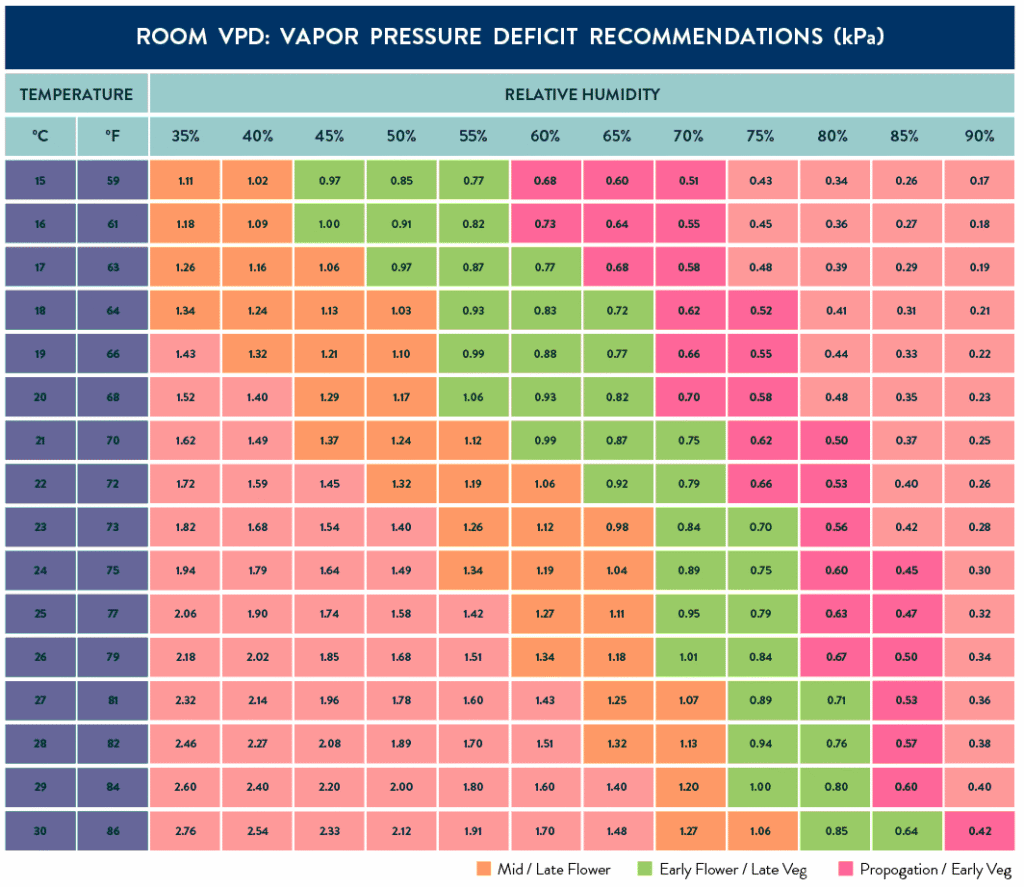
The VPD calculation is based on the plant’s phase. For example, in the early cycles, the plant needs a low value, and in more advanced phases, it needs a higher value. This value can be checked in the table below, and a better understanding can be accessed through the provided link.
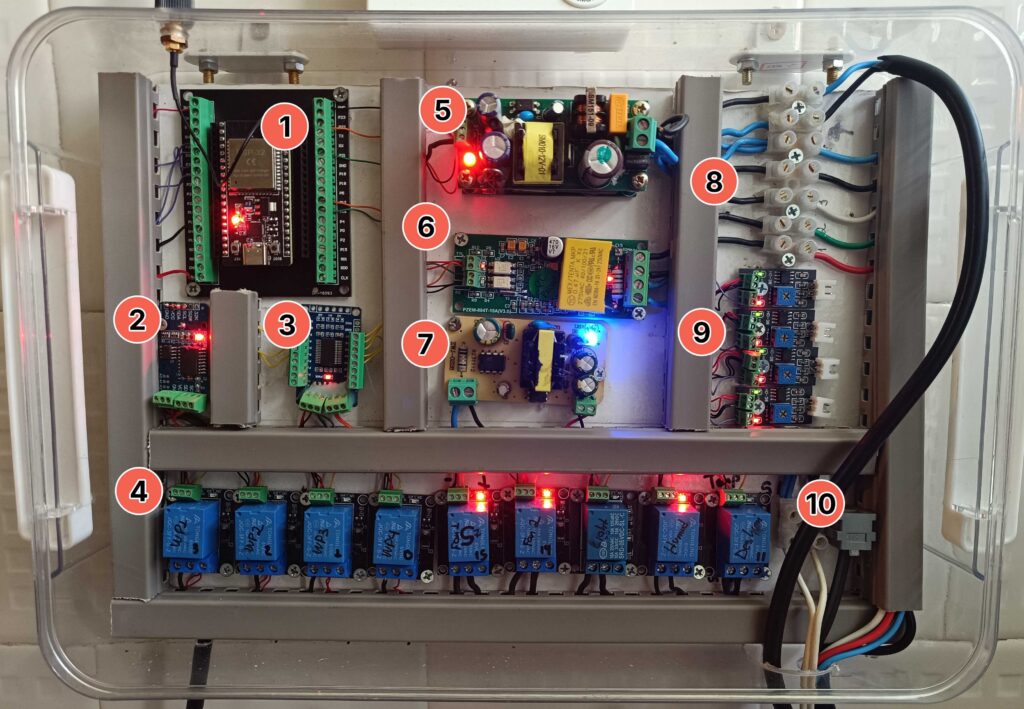
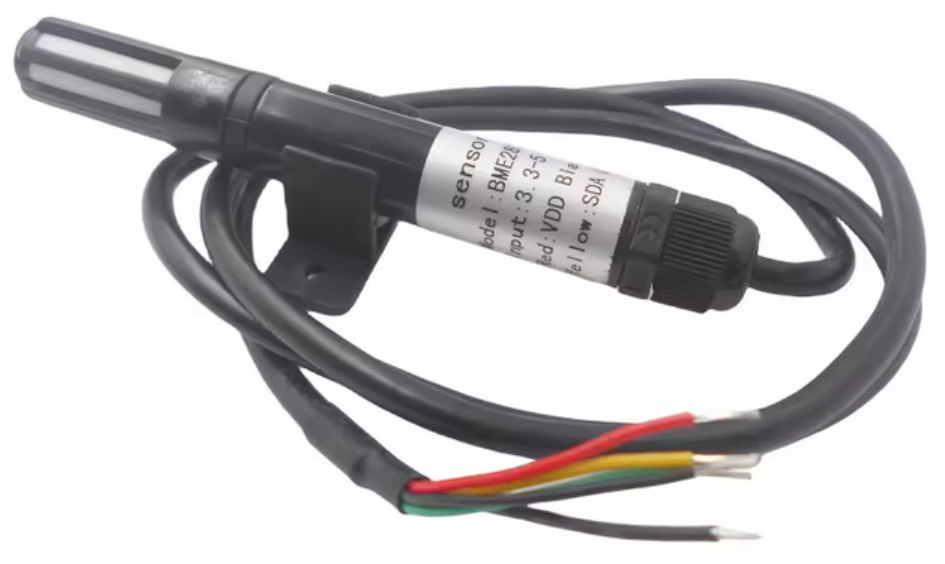
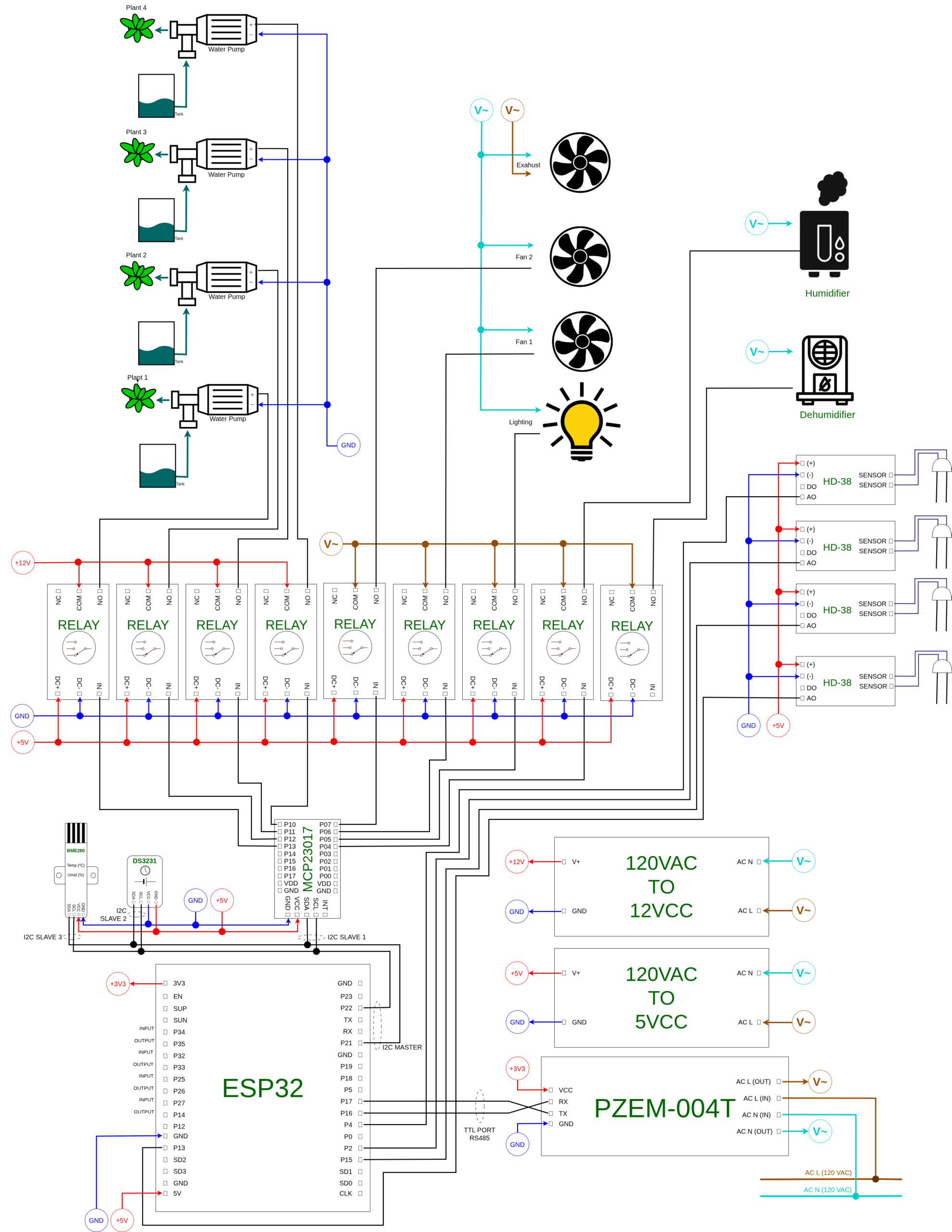
For all the project’s functionalities to work, several modules and components were used, interconnected directly to the ESP32, which receives inputs, processes the information, and triggers outputs. Among the modules used, there was a range of signal acquisition methods, such as analog signals from the soil moisture transmitters, I2C communication to connect to the real-time clock module (DS3231), the I/O expansion module (MCP23017), and the environment temperature and humidity sensor (BME280), activating the control relays, as well as Modbus RTU communication to capture electrical data.
Below, is how the project was assembled:
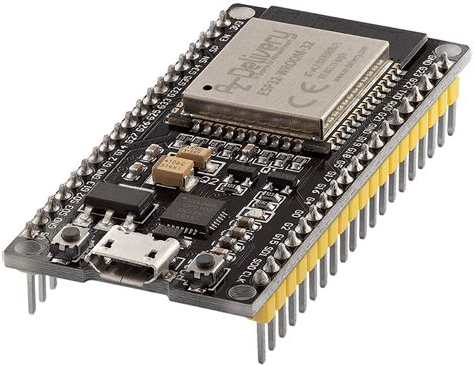
1 – ESP32 ‘ESP32 is a highly-integrated and low-power MCU with Wi-Fi and Bluetooth connectivity for IoT applications. It can function as a standalone system or as a slave device to a host MCU, and supports various interfaces and modules’. Datasheet
2 – DS3231 ‘The DS3231 is a low-cost, extremely accurate I²C real-time clock (RTC) with an integrated temperature-compensated crystal oscillator (TCXO) and crystal. The device incorporates a battery input, and maintains accurate timekeeping when main power to the device is interrupted’. Datasheet
3 – MCP23017 ‘The MCP23017/MCP23S17 (MCP23X17) device family provides 16-bit, general purpose parallel I/O expansion for I2C bus or SPI applications’. Datasheet
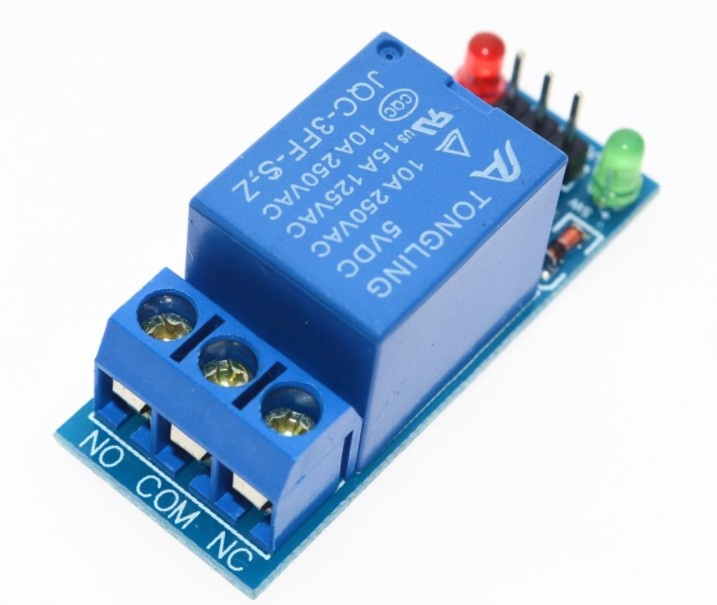
4 – JQC-3FF-S-Z Relay ‘JQC-3FF-S-Z is a 10A, PCB type, Form C relay with silver alloy contacts’. Datasheet
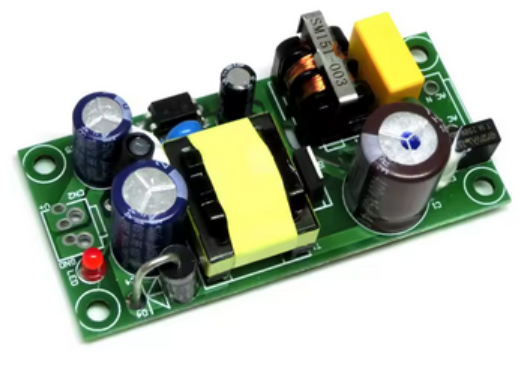
5 – 12 and 5VDC Power Supply Power supplies stacked on top of each other, with 127VAC input and 5 and 12VDC outputs.
6 – PZEM-004T ‘AC communication module, the module is mainly used for measuring AC voltage, current, active power, frequency, power factor and active energy’. Datasheet
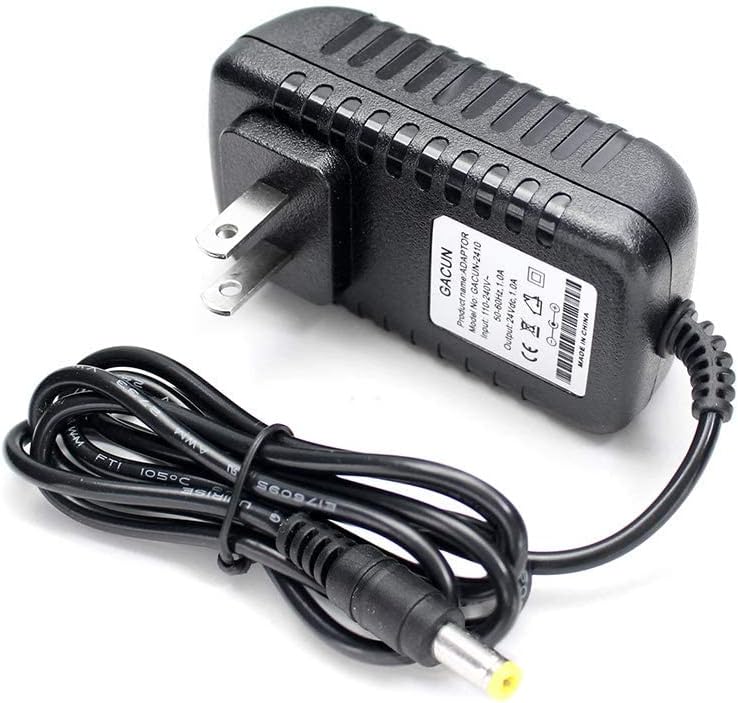
7 – 24VDC Power Supply 24VDC power supply. It was necessary to remove it from its protective casing so that it would fit in the project. Used to power the humidifier.
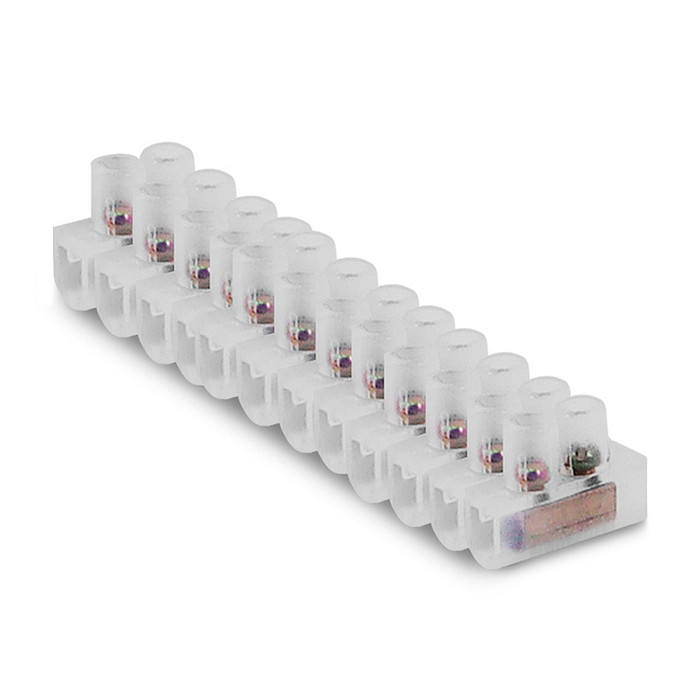
8 – Terminal blocks Terminal blocks used to separate the control of the 127V circuits, such as the fans, lighting, and dehumidifier.
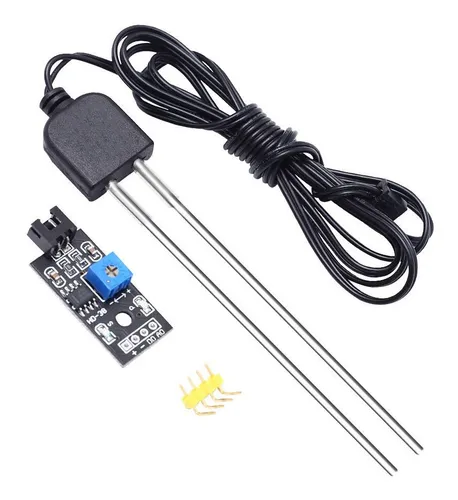
9 – HD-38 Soil Moisture ‘Soil Moisture Sensor Module HD-38 module is designed for precise moisture detection within the soil, enabling accurate monitoring of water content’. Datasheet
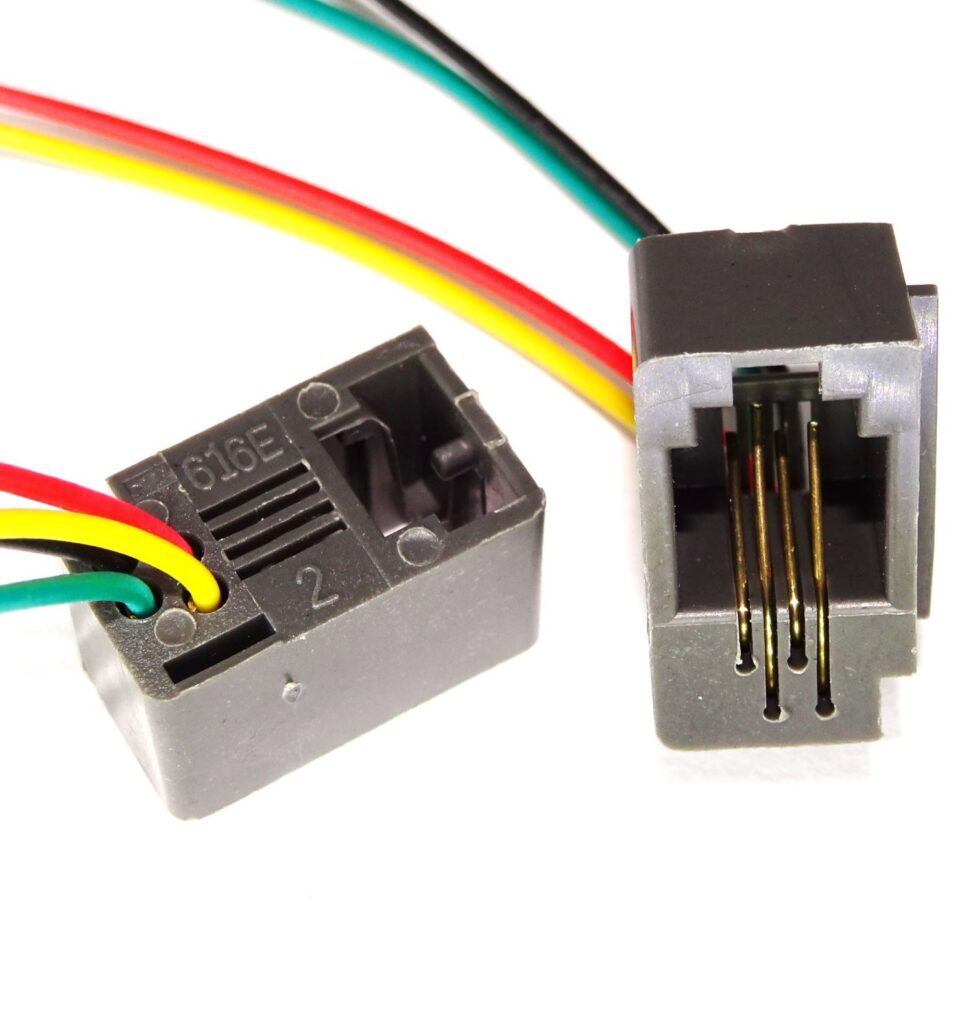
10 – I2C Conection To improve the connection with the temperature and humidity sensor installed inside the controlled environment, an RJ-11 connector was fixed in place.
11 – BME280 ‘BME280 Humidity, Temperature and Pressure Sensor designed for low current consumption (3.6μA at 1Hz), long-term stability, I2C communication, and high EMC robustness’. Datasheet
Electronic Diagram
During the physical development of the project, it was necessary to create an electronic diagram as a support base for assembling the device panel. This was also done to facilitate maintenance in case of component failure or communication issues.
Next Steps
This is a project that is always under construction. As new features, configurations, or expansions occur, the information contained on this site will be updated. Below, I list some of them that are on the project’s roadmap.
1 – Soil moisture sensor readings
All components are installed and physically working. However, the values read from the measurements show electromagnetic interference when the lighting is on. I am planning to change the project’s architecture to eliminate this issue.
2 – Plant phase definition interface
Currently, the plant phase definition is being set by manually sending an MQTT message to the ‘worg/plant_phase’ topic, which is then written to a .csv file. I plan to develop some graphical way to change these parameters, probably through restricted access on this same website. I am evaluating whether this option is the best in terms of human-machine interaction.
3 – Log monitoring
At certain times that do not follow any specific pattern, the system freezes. Generally, there is a gap of months between each incident. I plan to implement log monitoring via Grafana Loki to better understand the occurrence.
4 – MQTT communication with SSL
Despite several attempts, I had numerous issues with the SSL certificate. For this implementation, the system required a lot of processing and ended up affecting environmental control. I still intend to implement it, perhaps by focusing on thread control or migrating to a programming language that natively provides improved memory and process management.
My CV
Below you can follow my professional journey, stay in touch with me, and get to know me better 🙂